
Stock video footage has become a surprisingly reliable side hustle—or even a full business—for many creators. Whether you’re capturing everyday moments, nature scenes, or dynamic urban life, the demand for high-quality, versatile clips remains strong across advertising, social media, and corporate projects. I’ve dabbled in this myself over the years, and what started as weekend experiments with a basic camera turned into clips that still generate passive income. It’s not about fancy Hollywood setups; it’s about understanding what buyers want and delivering it consistently.
If you’re just starting out, this guide cuts through the hype. We’ll cover realistic equipment choices that deliver results without breaking the bank, practical shooting and editing advice, and proven tips for getting your videos approved and selling on major platforms.
Why Stock Videos Still Make Sense
Unlike one-off client work, stock footage can earn royalties repeatedly. Platforms pay when someone licenses your clip, and evergreen content (think slow-motion coffee pours, bustling city streets, or abstract b-roll) keeps working for you. In 2026, trends lean toward authentic, 4K/8K footage with clean audio options, diverse representation, and practical business or lifestyle scenarios.
The barrier to entry is lower than ever, but success comes down to quality, keywords, and persistence.
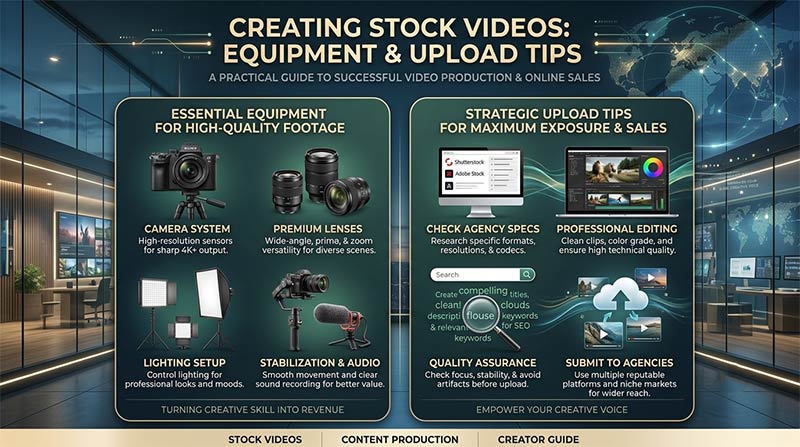
Essential Equipment for Stock Video Creators
You don’t need a cinema camera to start. Focus on reliability, good low-light performance, and stabilization. Here’s a practical breakdown of gear that works well for stock production:
| Category | Budget Option | Mid-Range Recommendation | Pro Pick | Why It Matters for Stock |
|---|---|---|---|---|
| Camera | Sony ZV-E10 or smartphone (with stabilization) | Sony ZV-E1 or Panasonic Lumix GH7 | Blackmagic PYXIS 12K or Sony FX3 | 4K/60fps, great autofocus, log profiles for flexibility in editing |
| Lens | Kit lens or prime (e.g., 50mm f/1.8) | Viltrox or Sigma primes | Cinema lenses with consistent aperture | Sharpness and bokeh for cinematic feel |
| Stabilization | Handheld gimbal like DJI Osmo Mobile | Zhiyun M40SE or Ronin-SC | Full gimbal or built-in IBIS | Smooth footage that stands out in searches |
| Audio | Built-in or basic lav mic | Rode Wireless GO II | High-end shotgun or XLR setup | Clean sound for clips needing voiceover or ambiance |
| Lighting | Natural light + reflector | Portable LED panels (Godox or Aputure) | Full kit with softboxes | Consistent exposure, especially indoors |
| Accessories | Tripod, extra batteries | ND filters, drone (DJI Mini series) | Slider, matte box | Versatility for different shot types |
Start simple. Many successful stock contributors began with a mirrorless camera and natural light. A good tripod and gimbal make a bigger difference than upgrading your body right away. Drones open up aerial perspectives that sell particularly well.
Overkill gear often sits unused. Invest in what lets you shoot more often—consistency beats perfection every time.
Shooting Tips That Boost Your Approval Rate
- Variety is key: Shoot the same scene in wide, medium, and close-up shots. Include slow pans, tilts, and static holds (10-30 seconds each).
- Lighting and composition: Golden hour and soft diffused light win. Use the rule of thirds and leading lines. Avoid harsh shadows unless it’s stylistic.
- Motion and pacing: Buyers love usable b-roll. Think subtle movements—people walking naturally, hands typing, leaves rustling—rather than overly dramatic action.
- Technical specs: Record in 4K at least, log or flat profile if possible, and maintain clean exposure. 24fps or 30fps works for most stock; higher for slow-mo.
- Diversity and trends: Include people of different ages, abilities, and backgrounds. Current hot categories include remote work, sustainable living, AI/tech interfaces, and wellness.
Always shoot more than you think you’ll need. One location can yield dozens of clips.
Editing for Stock Success
Keep it simple and flexible. Use DaVinci Resolve (free version is powerful) or Adobe Premiere. Export in common codecs like H.264 or ProRes. Provide versions with and without music/audio where relevant. Color grade neutrally so buyers can adapt it easily. Short clips (10-60 seconds) perform best, but longer sequences have their place too.
Add subtle motion graphics or text placeholders if it fits the theme, but don’t overdo it—buyers want raw material they can customize.
Uploading and Selling: Platforms and Pro Tips
Major platforms in 2026 include Shutterstock, Pond5, Adobe Stock, Getty Images (via partners), Artgrid, and Envato. Each has different requirements and payout models.
Step-by-step upload process (general across sites):
- Create a contributor account (approval can take days to weeks).
- Prepare files: High-resolution, properly named, with detailed descriptions.
- Keywords and titles: Be specific and comprehensive. Use tools or research trending searches. Include primary terms like “business meeting 4K,” location, and mood.
- Categories and releases: Model/property releases are crucial for footage with recognizable people.
- Upload in batches and track performance.
Platform tips:
- Shutterstock: High volume, competitive. Focus on trends and quantity.
- Pond5: Better royalties for exclusive or high-quality content. Great for cinematic footage.
- Adobe Stock: Seamless if you’re in the Creative Cloud ecosystem.
Optimize metadata ruthlessly—it’s what makes your clips discoverable. Many creators use spreadsheets to manage keywords across platforms.
Early on, I uploaded generic clips that barely sold. Once I started researching what was actually downloading (office environments, nature transitions, food prep), things picked up. Treat it like a long game; your first 100 clips might not earn much, but momentum builds.
Common Pitfalls to Avoid
- Low resolution or shaky footage gets rejected.
- Poor keywording hides your work.
- Ignoring legal requirements (releases).
- Inconsistent style across your portfolio.
Stay patient and analyze sales data. What performs well? Double down on that.
Final Thoughts: Building a Sustainable Stock Video Business
Creating stock videos combines creativity with business smarts. Start with gear you already have or can afford, shoot what you love but with market needs in mind, and refine your process over time. Many creators earn a few hundred to several thousand dollars monthly once they have a solid library.
The best part? You own the process. No clients breathing down your neck—just you, your camera, and the world. Grab that gear, get outside (or inside), and start capturing. Your next top-seller could be just one thoughtful shot away.
Ready to dive in? Check out contributor portals on Shutterstock, Pond5, or Adobe Stock.
What kind of footage are you planning to create first? Drop your thoughts below—I’d love to hear and maybe share more specific recommendations.

Disclaimer: This is for educational purposes only and not personalized financial advice. Past performance doesn’t guarantee future results. Always do your own research or seek professional guidance.